Universal Clipboard vs a Clipboard Manager on Mac: What Is the Difference?
Quick answer: Universal Clipboard moves your latest copied item between nearby Apple devices signed in to the same Apple Account. A clipboard manager keeps a history of many copied items on your Mac so you can search and paste earlier ones. They solve different problems and can be used together.
- Author
- KainoLab Team
- Published
- Oct 31, 2026
- Product
- Historr
Photo: Omar Al-Ghosson on Unsplash. The cover is a stock photograph, not a Historr screenshot.
Publisher disclosure: Historr is made by KainoLab, the publisher of this guide. Product details were checked against official pages on 31 October 2026. This is not an independent test.
People often confuse Universal Clipboard with clipboard history. They sound similar but do different jobs. One moves a copied item between devices. The other remembers many items on one device.
This guide explains both, what Apple says about requirements and how to decide which you need.
What is Universal Clipboard?
Apple’s Universal Clipboard article says you can copy text, images, photos and videos on one Apple device and paste on another nearby device. The content is added to the other device’s clipboard automatically. Apple says it remains there briefly, or until you replace it by copying something else on either device.
Requirements listed by Apple include:
- Devices near each other.
- The same Apple Account signed in on each device.
- Bluetooth and Wi-Fi turned on.
- Handoff turned on, which is on by default.
Apple’s Mac copy and paste guide covers the Mac side.
What is a clipboard manager?
A clipboard manager records many copied items on your Mac. You open a list, search and paste a previous one. It does not move content to another device unless the tool also offers sync.
How do they compare?
| Question | Universal Clipboard | Clipboard manager |
|---|---|---|
| What does it do? | Moves the current copy to a nearby device | Keeps a history of copies on a Mac |
| How many items? | The latest copied item | Many items, with search |
| Devices | Mac, iPhone, iPad and Apple Vision Pro | Mac, unless the tool adds sync |
| Time limit | Briefly, per Apple | Depends on your history settings |
| Setup | Same Apple Account, Bluetooth, Wi-Fi, Handoff | Install an app |
When should you use each?
- Universal Clipboard is best when you copy text or an image on an iPhone and paste it into a Mac document right away.
- A clipboard manager is best when you want to recover something you copied earlier, queue several values or paste in a special format.
If you work only on a Mac, a manager adds more. If you work across devices, Universal Clipboard covers the quick transfer and a manager covers history on the Mac.
Can they work together?
Yes. When Universal Clipboard delivers an item to your Mac, it lands on the clipboard like any other copy. A running clipboard manager can then record it in history. Check your manager to confirm it captures those items on your setup, because behaviour can vary.
What if Universal Clipboard is not working?
Apple suggests checking these basics:
- Both devices are near each other.
- Both use the same Apple Account.
- Bluetooth and Wi-Fi are on.
- Handoff is on.
- Software updates are installed, and devices are restarted.
If it still fails, a clipboard manager will not fix the transfer, because it only sees what reaches the Mac’s clipboard.
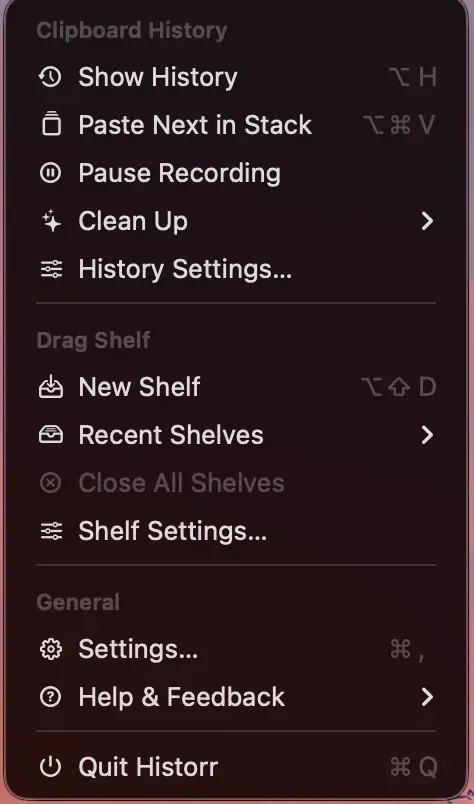
Real Historr screenshot supplied on 8 October 2026 (version 0.1.6). It illustrates the interface only.
What about macOS Tahoe’s clipboard history?
Apple documents a clipboard history you can open from Spotlight in macOS Tahoe. See Apple’s clipboard history guide. It covers some of what a clipboard manager does on one Mac, but it is separate from Universal Clipboard. For longer history, paste queues or a file shelf, see our best clipboard manager for Mac guide.
A practical example
Suppose you photograph a whiteboard on your iPhone and want the image in a Mac document. Universal Clipboard can bring that image to your Mac clipboard for a short time, so paste it straight away. Later you realise you also need the earlier link you copied that morning. Universal Clipboard cannot help, because it only holds the latest item. A clipboard manager can, because it recorded that link in its history. The first tool moves one item between devices; the second remembers many items on one device.
Frequently asked questions
Does Universal Clipboard keep a history? Apple describes the content as remaining briefly or until you copy something else, so it is not a history.
Does Historr sync between devices? No. Historr stores history locally on your Mac and has no cloud sync, according to its privacy documentation.
Which should I try first? If you only need to move one item between your iPhone and Mac, use Universal Clipboard. If you keep losing earlier copies, try a clipboard manager.
Does Universal Clipboard work with Apple Vision Pro? Apple’s article lists Mac, iPhone, iPad and Apple Vision Pro among supported devices.
Key takeaways
- Universal Clipboard transfers the latest copy between nearby Apple devices.
- A clipboard manager keeps a searchable history on one Mac.
- Use both if you need quick transfers and a history.


