Best Drag and Drop Shelf Apps for Mac: Yoink, Dropover and Historr Compared
Quick answer: A drag and drop shelf app gives you a temporary place to hold files, images, links and text while you move between apps. Yoink offers an edge shelf for a one-time price, Dropover adds cloud actions and automation, and Historr is free and pairs a shelf with clipboard history. Choose by how you open it, price and extras.
- Author
- KainoLab Team
- Published
- Oct 31, 2026
- Product
- Historr
Photo: UX Indonesia on Unsplash. The cover is a stock photograph, not a Historr screenshot.
Publisher disclosure: Historr is made by KainoLab, the publisher of this guide. Product details were checked against official pages on 31 October 2026. This is not an independent test.
Moving files between windows is awkward when the source and destination are far apart. A shelf app holds items temporarily so you can open the destination first, then drag everything out. This guide compares three shelf apps and explains how to choose. KainoLab makes Historr, so treat this as a publisher’s comparison.
What is a drag and drop shelf?
A shelf is a small floating tray. You drop files, images, links or text onto it, switch to another app or folder and drag the items out together. It saves you from juggling windows or building temporary folders.
What are the main options?
| App | Price notes | How it opens | Standout features |
|---|---|---|---|
| Yoink | One-time purchase, 28-day trial download | Slides from the screen edge; shortcut | Copy and move modifiers, Handoff, recent copied items |
| Dropover | Check the Mac App Store listing | Shake, shortcut, menu bar, notch, watched folders | Cloud actions, scripts, Siri Shortcuts, extensions |
| Historr | Free | Shake, Option-Shift-D, menu bar | Clipboard history, Paste Stack, transforms |
Check each site for current details, as prices and features change.
How do you choose?
- Pick your trigger. Edge, shake, shortcut or menu bar? Try each to see what feels natural.
- Decide on actions. Do you need cloud upload, scripts or only drag out? Quick Look, resizing and ZIP are common.
- Consider clipboard use. If you also want clipboard history, Historr includes it. Yoink stores recent copies. Dropover links shelf and clipboard.
- Check macOS. Yoink lists macOS 10.13 or newer, Historr lists macOS 13 or newer.
- Think about price. Free, one-time or other models.
What do shelf actions look like in practice?
Historr’s Drag Shelf documentation lists a menu with Quick Look, Share, AirDrop, Save to Folder, Compress to ZIP, Resize Images and Extract Text. It also says images resize as copies at 50 percent or capped sizes and never change the originals. Dropover lists file actions such as resizing, text extraction and ZIP, plus cloud destinations and automation.
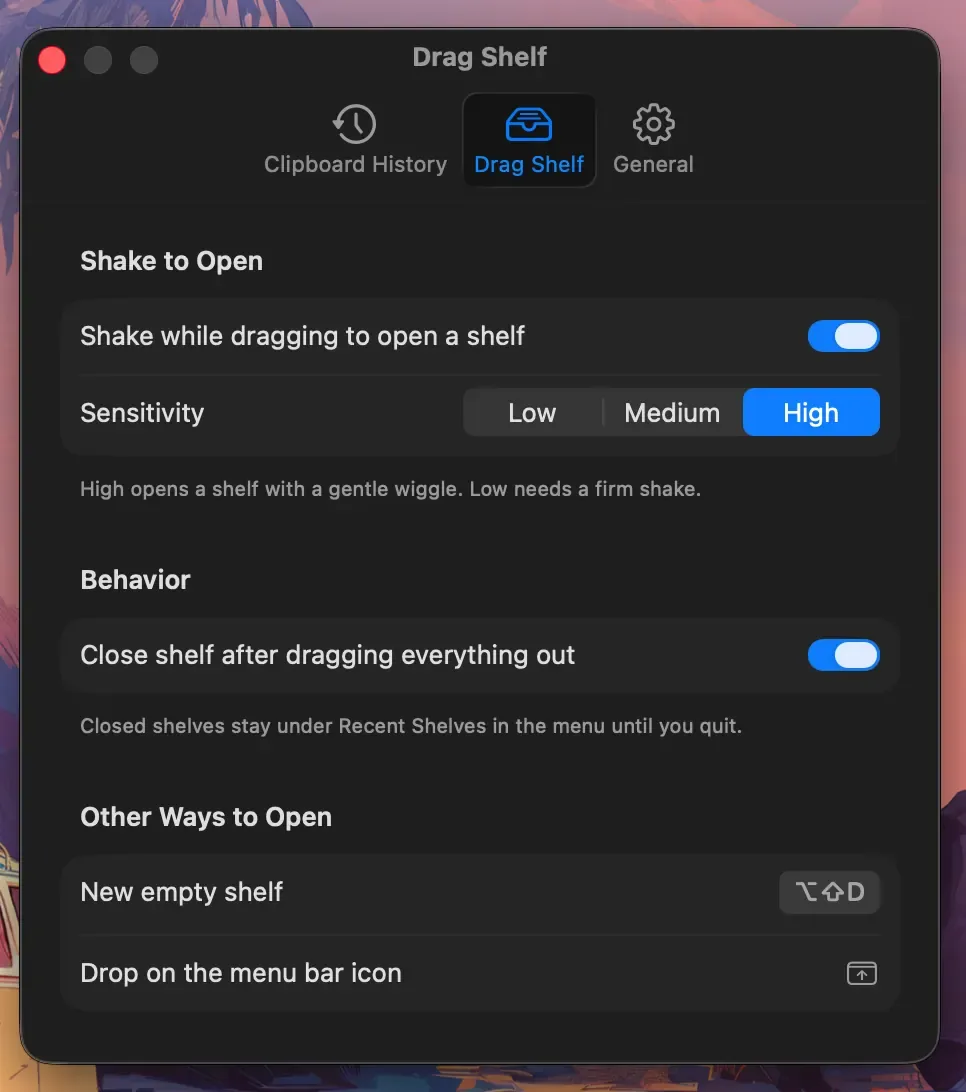
Real Historr screenshot supplied on 8 October 2026 (version 0.1.6). It illustrates the interface only.
How should you use a shelf safely?
- Check where items go. After the first drag, confirm the destination received what you expected.
- Know copy versus move. Historr says items drop as copies. Yoink lets you force copy or move with modifier keys.
- Do not treat it as an archive. Historr shelves are temporary and are deleted when you quit.
- Mind sensitive files. Quit or clear shelves after handling private documents.
What are good everyday uses?
- Gathering screenshots and a PDF to attach to one email.
- Collecting files from several folders before compressing them. See zip files from different folders on Mac.
- Moving images between a design tool and a document.
- Staging attachments locally. See local file staging on Mac.
Which should you try first?
If you want a polished edge shelf and do not mind paying, try Yoink’s trial. If you want cloud actions and automation, try Dropover. If you want a free option with clipboard history, try Historr. Compare directly in Dropover vs Historr and Yoink vs Historr, or read how to choose a Dropover alternative.
A starter workflow
Open the folder where you want the files to end up. Drag each source file onto the shelf, one at a time or in a group. Check the shelf shows everything you expect. Drag the whole pile into the destination and confirm the files arrived. Close the shelf or clear it. Repeating this simple loop a few times shows quickly whether the app fits you.
Frequently asked questions
Do I need a shelf app? Not always. If you rarely move several files at once, Finder may be enough.
Will a shelf app slow my Mac? Most are light, but test on your Mac. Quit unused apps and watch Activity Monitor.
Can a shelf hold links and text? Yes. Historr documents files, folders, images, links and text. Yoink and Dropover list broad support too.
Do shelf apps work with all apps? Most work with anything that supports drag and drop. Some apps handle drops differently, so test your important destinations.
How long do items stay on a shelf? It depends on the app. Historr shelves are temporary and are not saved after you quit.
Key takeaways
- A shelf is a temporary tray for items you drag between apps.
- Yoink, Dropover and Historr differ on price, opening method and extras.
- Test with one real task and verify the results.