
Free Clipboard Manager for Mac: What Free Really Means
Quick answer: Free clipboard managers for Mac fall into three groups: open-source tools like Maccy, free apps like Historr, and free tiers or trials of paid apps. Check whether free means free forever, a trial, or a limited version, and review macOS support, privacy and update practices before choosing.
- Author
- KainoLab Team
- Published
- Oct 31, 2026
- Product
- Historr
Photo: Julian Hochgesang on Unsplash. The cover is a stock photograph, not a Historr screenshot.
Publisher disclosure: Historr is made by KainoLab, the publisher of this guide. Product details were checked against official pages on 31 October 2026. This is not an independent test.
Free is an attractive word, but it can mean different things. Some clipboard managers are free forever, some are free with paid upgrades and some are free only for a trial. This guide explains the types and what to check before you install one. For a broader comparison, see our best clipboard manager for Mac guide.
What kinds of free clipboard managers are there?
| Type | Example | What to know |
|---|---|---|
| Open source | Maccy | MIT licence, source on GitHub, listed as free on its site |
| Free app | Historr | Described as free with no subscription, account or upsells |
| Trial of a paid app | Yoink | One-time price after a 28-day trial download |
| Built into macOS | Spotlight clipboard history | Included with macOS Tahoe, see Apple’s guide |
Pricing and terms change, so confirm them on each official page.
How can a free tool make money, and does it matter?
Some free apps are supported by donations, sponsorship or a paid version. Others are made by a company that sells related products. KainoLab makes Historr, and says so in every guide we publish. Knowing how a tool is funded helps you judge how long it will be maintained.
Ask three questions: Is the source code public? Is there a clear privacy statement? Are there regular updates? An open-source tool lets anyone inspect the code. A closed-source tool should document what it stores and sends.
What should you check before installing?
- macOS support. Maccy lists Sonoma 14 or later. Historr lists macOS 13 Ventura or later.
- Distribution. Download from the official site or a trusted store. Maccy warns about fake sites and names maccy.app as its official site.
- Signing. Historr documents that its app is signed with a Developer ID and notarized by Apple. Notarization is one reason macOS lets an app open without warnings.
- Privacy. Look for local storage and clear statements about telemetry and updates.
- Update method. Historr checks for updates once a day from version 0.1.5 and lets you turn it off.
What features come with free tools?
Features vary widely. A minimal tool focuses on a fast, searchable text history. A more complete one may add favourites, paste transforms, a paste queue and a file shelf. Historr includes all of these in its free app. Free does not have to mean basic, but it does not always mean complete either.
What are the trade-offs?
- Support. Free tools may have community or email support rather than guaranteed response times.
- Features. A free tool may skip sync across devices. If you need sync, compare options carefully.
- Longevity. Check how long a project has been maintained and whether releases are recent.
How do you pick one?
Decide what you need first: simple history, text transforms, a paste queue, or a shelf. Then try one or two free tools for a day each. Our clipboard manager checklist covers ten things to compare.
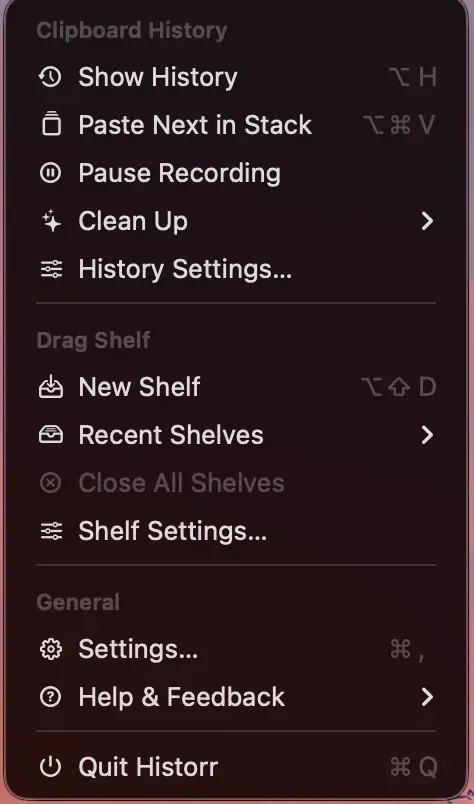
Real Historr screenshot supplied on 8 October 2026 (version 0.1.6). It illustrates the interface only.
A quick safety routine for any free app
Before you rely on a free tool, spend ten minutes on three checks. First, find the official site and confirm the download link comes from it, because fake download pages exist. Second, read the privacy statement and note what the app stores and sends. Third, copy a harmless test phrase, confirm it appears in history, then clear history and confirm it is gone. These steps catch most problems before the app handles anything sensitive.
Frequently asked questions
Is a free clipboard manager safe? It can be, if it is from a clear source, signed, and documented. Read its privacy page and check what permissions it asks for. Historr, for example, asks for macOS Accessibility access to paste into other apps, as its documentation explains.
Why does a clipboard manager need Accessibility permission? Pasting into other apps usually requires it. Capturing copies may not. Read the explanation in the app’s documentation.
Will free tools stay free? There is no guarantee. Terms can change. If you rely on a tool, keep an eye on its announcements and know how to export or replace it.
Can a free clipboard manager include a paste queue or a shelf? Yes. Historr, for example, includes a Paste Stack and a Drag Shelf in its free app. Check each tool’s documentation for what it includes.
How do I know an app is notarized? Developers usually say so in their documentation. If macOS shows a warning when you open an app, stop and verify the download source.
Key takeaways
- Free can mean open source, a free app or a trial.
- Check macOS support, signing, privacy and updates.
- Match the tool to the features you will use.


