
A Minimalist Clipboard Manager for Mac: Less Clutter, Faster Paste
Quick answer: A minimalist clipboard manager for Mac does a few things well: it keeps a short, searchable history, opens with one shortcut and pastes with Enter. Look for a small interface, local storage, no account and the ability to hide advanced features. Maccy and Apple Spotlight history are minimal options; Historr offers extras you can ignore.
- Author
- KainoLab Team
- Published
- Oct 31, 2026
- Product
- Historr
Photo: Nikita Kachanovsky on Unsplash. The cover is a stock photograph, not a Historr screenshot.
Publisher disclosure: Historr is made by KainoLab, the publisher of this guide. Product details were checked against official pages on 31 October 2026. This is not an independent test.
Some people want every feature. Others want a tool that stays out of the way. A minimalist clipboard manager is for the second group: a small, quiet app that remembers what you copied and nothing more.
This guide explains what minimal means in practice, which tools fit and how to keep any manager simple.
What makes a clipboard manager minimalist?
A minimal tool usually has these qualities:
- One purpose. It records and shows your copy history.
- A small interface. A short list, a search field and little else.
- One shortcut. Open, type, press Enter.
- No account. It works without signing in.
- Local storage. History stays on your Mac.
Maccy’s site describes this idea well: it does one job, keeping your copy history at hand, and avoids unnecessary features. It is open source under the MIT licence and, per its site, requires macOS Sonoma 14 or later.
Is Apple’s built-in history minimal enough?
For many people, yes. Apple documents a clipboard history in macOS Tahoe that you open from Spotlight. See Apple’s guide to searching your clipboard history. If it covers your needs, you can avoid installing anything. Check how long it keeps items and whether it can be turned off in your Spotlight settings.
What if you want minimal, but with a few extras?
Minimal does not have to mean bare. You may want one or two features, such as paste as plain text or favourites, without a busy window. Historr is a fuller tool, but its everyday flow is small: press Option-H, type to filter, press Return. The extras, such as the Paste Stack and Drag Shelf, stay out of the way until you use them.
| Need | Minimal approach |
|---|---|
| Find something copied earlier | Open history, type a few letters |
| Paste without formatting | Use a plain text paste option |
| Keep a few snippets | Favourite them |
| Avoid sensitive data | Pause recording or use expiry settings |
How do you keep any clipboard manager simple?
- Limit the history. Fewer items are easier to scan. Historr has a setting for the maximum number of history items.
- Learn three shortcuts. Open history, paste the selected item and close. Historr lists Option-H, Return and Esc in its shortcut reference.
- Turn off what you do not use. Disable optional features and automatic update checks if you prefer.
- Favourite sparingly. Pin only items you reuse weekly.
- Review privacy settings once. Set expiry and pause behaviour, then leave them.
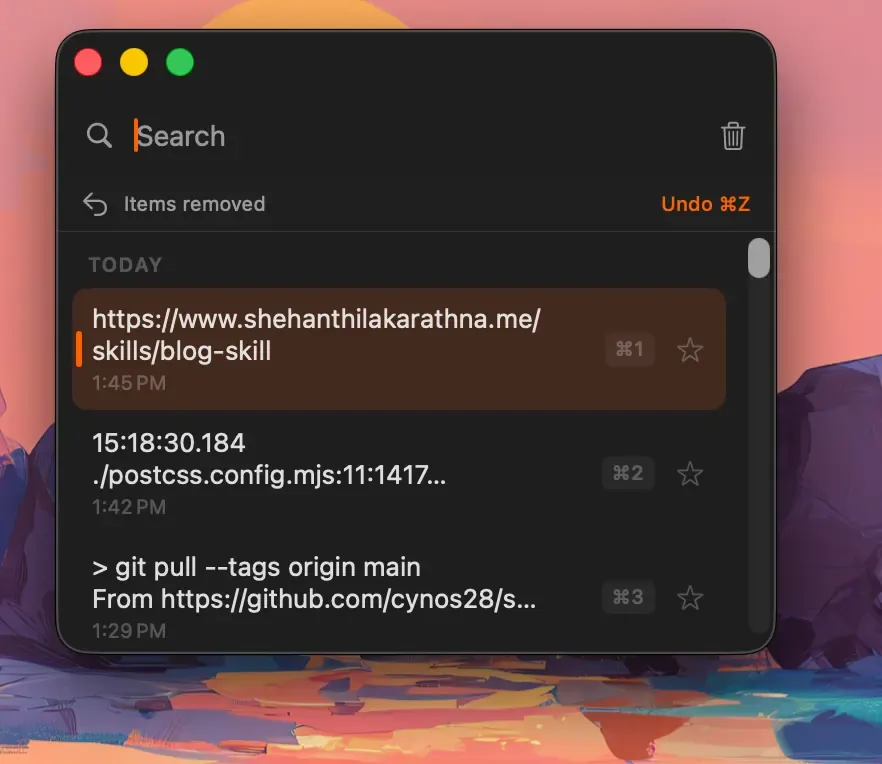
Real Historr screenshot supplied on 8 October 2026 (version 0.1.6). It illustrates the interface only.
What should a minimalist skip?
Be honest about what you need. You can usually skip cloud sync, snippet libraries, themes and automation if you only paste recent text. Extras are only valuable if you use them every week.
If you later need more, you can add it. Try a minimal tool first and expand only if a real problem appears. Our guide to choosing a clipboard manager covers what to compare.
A one-week trial plan
Use a minimal tool for seven days and keep a short note each evening. Write down how many times you opened it, what you were looking for and whether you found it quickly. If you opened it only once or twice, Apple’s built-in history may be enough. If you opened it daily and found things fast, keep it. If you wished for one missing feature, name that feature precisely before looking at heavier tools. This keeps the decision based on your own use rather than on a feature list.
Frequently asked questions
Is a minimalist clipboard manager less safe? Not necessarily. Safety depends on storage, permissions and how the tool treats sensitive copies, not on the number of features.
Does Historr count as minimalist? It has more features than the simplest tools, but the main workflow is a short history opened by a shortcut. You can ignore the Paste Stack and shelf if you do not need them.
What is the simplest way to start? Try Apple’s built-in history for a week. If it falls short, try a minimal manager and compare.
Can I hide features I do not use? Some apps let you turn features off in Preferences. Others simply stay out of the way until you open them. Check the settings of the tool you pick.
How many history items should a minimalist keep? A smaller number, such as a few dozen, is easier to scan. Choose a size that covers a normal working day.
Key takeaways
- Minimal means few features, a small window and fast paste.
- Apple’s built-in history may be enough for light use.
- Keep any manager simple by limiting history and learning three shortcuts.


