
Historr vs Maccy: Which Free Mac Clipboard Manager Fits You?
Quick answer: Maccy is a free, open-source clipboard history tool focused on one job. Historr is a free app that adds a Paste Stack, paste transforms, smart actions, sensitive-copy expiry and a drag shelf. Choose Maccy if you want the simplest history, and Historr if you want those extras. Both store data locally; Historr is made by KainoLab.
- Author
- KainoLab Team
- Published
- Oct 31, 2026
- Product
- Historr
Photo: Taylor Flowe on Unsplash. The cover is a stock photograph, not a Historr screenshot.
Publisher disclosure: Historr is made by KainoLab, the publisher of this guide. Product details were checked against official pages on 31 October 2026. This is not an independent test.
Maccy and Historr are both free Mac clipboard managers, and they overlap. They differ in scope. This comparison uses each tool’s official pages. KainoLab makes Historr, so read this as a publisher’s comparison. Check maccy.app and historr.com for the latest details.
What is Maccy?
Maccy’s site describes a clipboard manager that does one job: keep your copy history at hand. It is open source under the MIT licence, with source code on GitHub, and is distributed through the Mac App Store and as a direct download. The site says it requires macOS Sonoma 14 or later, and that your data stays on your computer. It also warns about fake sites and names maccy.app as the only official one.
What is Historr?
Historr is a free macOS app that combines clipboard history with a Paste Stack, paste transforms, smart actions, auto-expiry for sensitive copies and a drag shelf. It requires macOS 13 Ventura or later, stores history locally and needs no account, according to its documentation.
How do they compare?
| Question | Maccy | Historr |
|---|---|---|
| Price | Free, per its site | Free, per its site |
| Licence | Open source (MIT) | Not stated as open source |
| macOS | Sonoma 14 or later | Ventura 13 or later |
| Clipboard history | Yes | Yes, with Today, Yesterday and Earlier groups |
| Search | Type to search | Filter as you type |
| Paste queue | Not listed on its site | Paste Stack |
| Paste transforms | Not listed on its site | Plain text, trimmed, case, slug, JSON |
| Drag shelf | Not listed on its site | Yes |
| Password manager copies | Cleared if the manager clears them | Ignored when marked concealed or transient |
| Storage | On your computer | Local, no cloud or telemetry |
Where this table says “not listed”, it means we did not find it on the official page, not that it is impossible. Verify before deciding.
Who is Maccy a better fit for?
- You want the simplest possible history with a tiny interface.
- You prefer open-source software you can inspect.
- You are on macOS Sonoma 14 or later and do not need extras.
See our minimalist clipboard manager guide.
Who is Historr a better fit for?
- You fill forms or enter several values and want a queue. See the Paste Stack documentation.
- You paste text in different formats and want transforms.
- You move files, images and text between apps and want a shelf.
- You run macOS 13 Ventura, which Maccy’s listed requirement of Sonoma 14 or later does not cover.
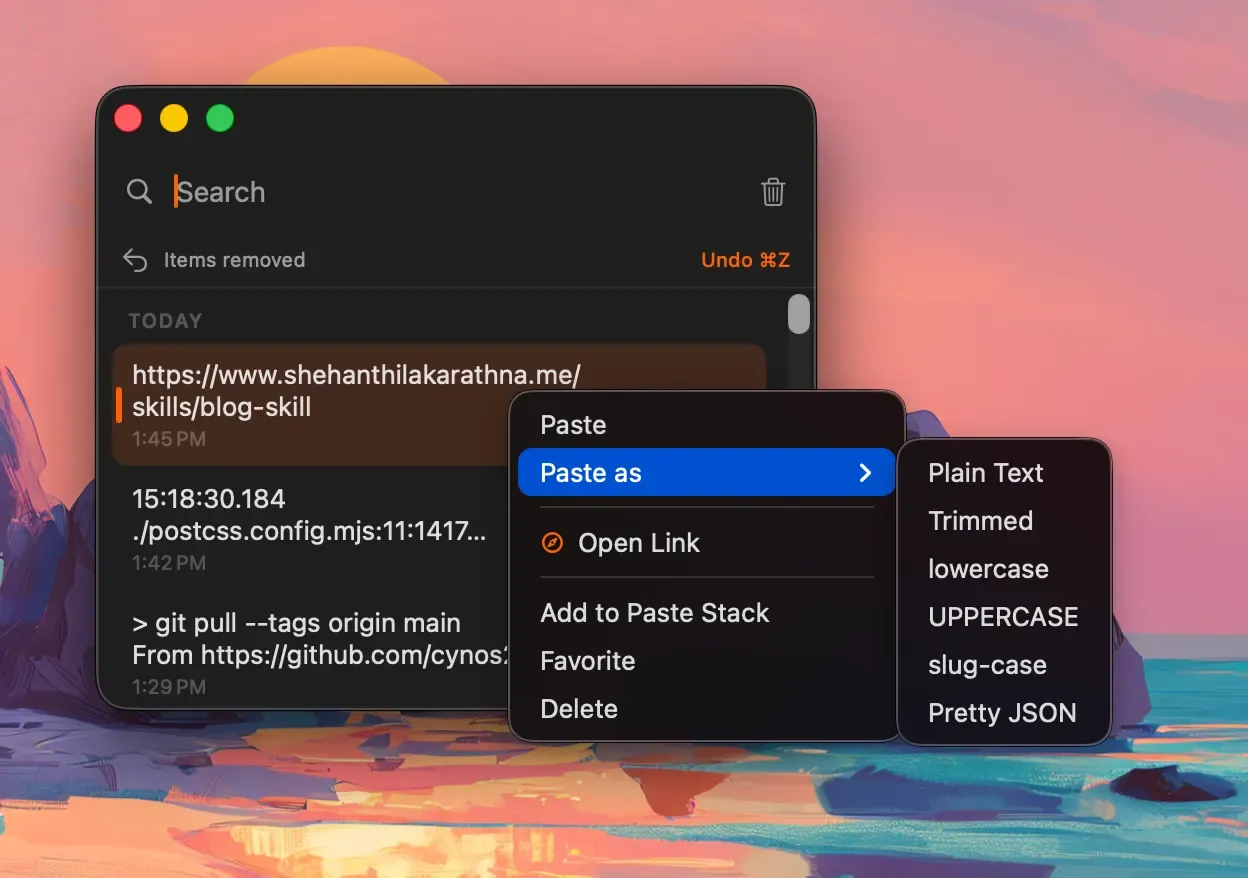
Real Historr screenshot supplied on 8 October 2026 (version 0.1.6). It illustrates the interface only.
What about switching?
If you move from Maccy to Historr, your history will not import automatically unless a tool says so. Our guide to switching from Maccy to Historr with saved items explains how to keep a few important items.
For more alternatives, read Maccy alternatives and what to compare and our best clipboard manager for Mac guide.
How should you decide?
- Write down what you do with the clipboard.
- Check macOS support for your Mac.
- Install each tool for a half day.
- Keep the one that feels fast and does not annoy you.
You can run only one at a time, so uninstall or quit the other.
A fair way to run the test
Pick one normal working day and run only one tool at a time. In the morning use Maccy, in the afternoon use Historr, or the other way round. Note how often you opened the history, whether you wished for a queue or a transform, and whether either app got in your way. Keep the notes short. At the end, the answer is usually obvious: the tool you forgot was running is often the right one.
Frequently asked questions
Is Historr a Maccy fork? We have no information that it is. The two are separate apps with different feature sets.
Which has better privacy? Both document local storage. Maccy’s code is open for review. Historr documents no telemetry and no account. Neither claims perfect protection of sensitive copies.
Can I use both? Not at once, as they may conflict. Try one at a time.
Which is easier to learn? Maccy is intentionally small. Historr has more features, but the main flow is the same: open, search, paste.
Do both work with password managers? Both describe handling copies from password managers. Maccy clears history items the manager clears, and Historr ignores copies marked concealed or transient.
Key takeaways
- Maccy is focused, free and open source; Historr adds queues, transforms and a shelf.
- Check macOS requirements: Maccy lists 14 or later, Historr lists 13 or later.
- Try each for a day and keep what fits your workflow.


