
Maccy Free Alternative for Mac: What to Compare Before You Switch
Quick answer: People look for a free Maccy alternative when they need a different macOS version, more features such as a paste queue, transforms or a file shelf, or built-in privacy controls. Compare macOS support, features, storage and updates. Historr, Apple Spotlight history and other free tools are options; test each with real work.
- Author
- KainoLab Team
- Published
- Oct 31, 2026
- Product
- Historr
Photo: Nick Morrison on Unsplash. The cover is a stock photograph, not a Historr screenshot.
Publisher disclosure: Historr is made by KainoLab, the publisher of this guide. Product details were checked against official pages on 31 October 2026. This is not an independent test.
Maccy is a well-liked, free clipboard manager. If you are looking for an alternative, there is usually a specific reason: a macOS version it does not support, a missing feature or a different preference. This guide helps you work out what to compare. KainoLab makes Historr, one of the options.
Why do people look for a Maccy alternative?
| Reason | What to look for |
|---|---|
| macOS version | Maccy’s site lists macOS Sonoma 14 or later; check an alternative’s minimum |
| Missing feature | Paste queue, transforms, smart actions or a file shelf |
| Privacy preference | Documentation on storage, expiry and network behaviour |
| Open-source preference | Source code availability and licence |
| Interface | A different layout or a simpler one |
Maccy is open source under the MIT licence and listed as free on its site. An alternative should offer something you actively need, not just a different name.
What free options exist?
- Apple’s Spotlight clipboard history. Included with macOS Tahoe. See Apple’s guide.
- Historr. A free app for macOS 13 Ventura or later, with a Paste Stack, transforms, smart actions, auto-expiry and a drag shelf. See historr.com.
- Other free or open-source tools. Search for options and check their source, update history and requirements.
Our free clipboard manager guide explains what free can mean, and Historr vs Maccy compares the two directly.
How do you compare candidates?
- List your must-haves. For example: runs on your macOS, no account, keyboard use.
- List your nice-to-haves. For example: queue, transforms, favourites.
- Check the documentation. Look for storage, permissions and update information.
- Test for half a day. Copy real work and see how it feels.
- Decide. Keep one, and remove the other.
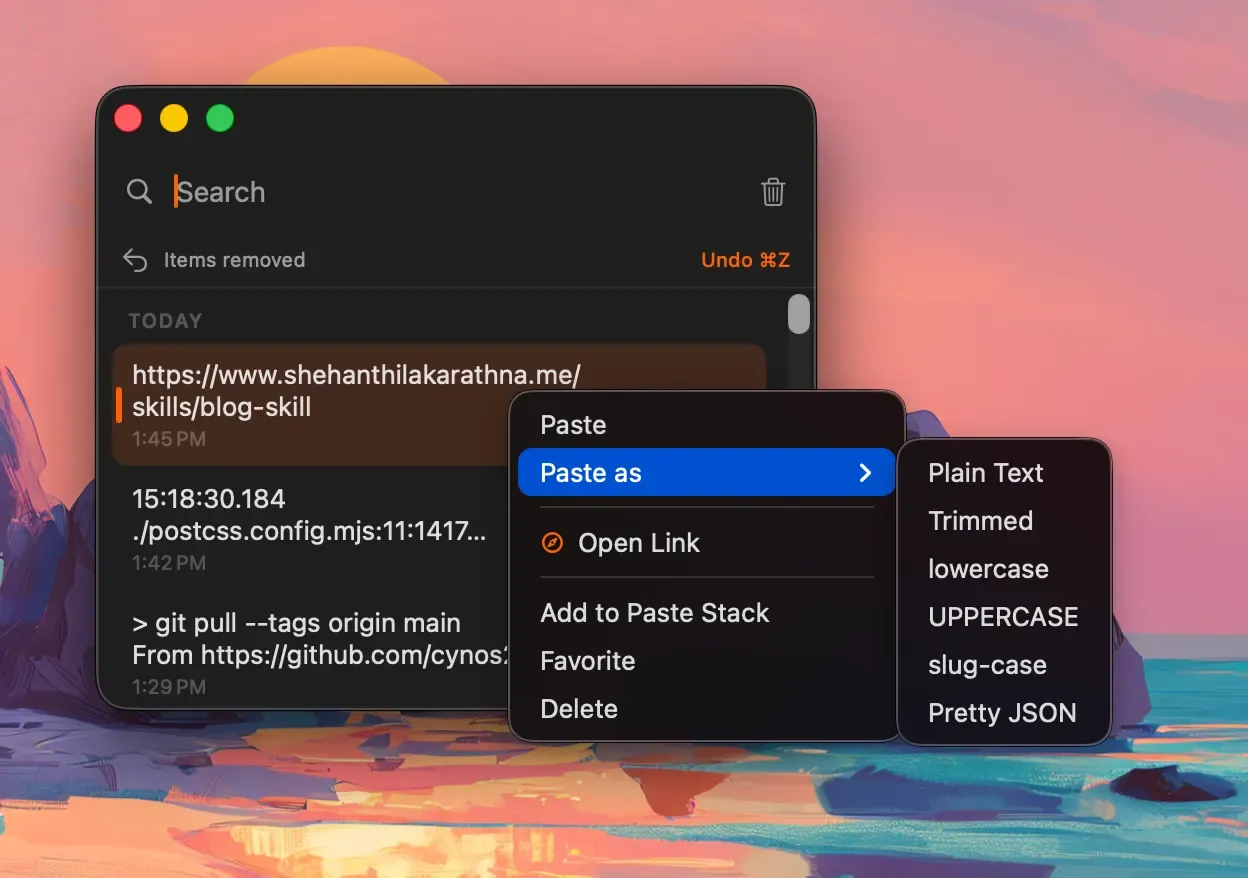
Real Historr screenshot supplied on 8 October 2026 (version 0.1.6). It illustrates the interface only.
What features might justify switching?
- A paste queue if you fill forms. Historr documents it in its Paste Stack guide.
- Paste transforms for plain text, case or JSON.
- Auto-expiry for sensitive values, documented on Historr’s privacy page.
- A drag shelf for files. See Maccy alternative with a file shelf.
If none of these matter to you, staying with Maccy may be the sensible choice.
How do you switch safely?
- Keep Maccy installed until you are happy with the new tool.
- Copy important items into notes or favourites in the new tool, because history may not import.
- Quit Maccy while you test, so two tools do not capture the same copies.
- Check shortcuts for conflicts.
- Remove the old tool when you are done.
For a worked example, read switching from Maccy to Historr with saved items.
What about macOS Ventura?
Maccy’s site lists macOS Sonoma 14 or later. If you run macOS 13 Ventura, check an option that lists support for it. Historr lists macOS 13 Ventura or later. See free Maccy alternative for macOS Ventura.
A decision shortcut
If Maccy does everything you need and runs on your Mac, you may not need an alternative. If you need a feature it does not list, or support for a macOS version it does not cover, make a short list of two options and test them. Write down the single reason you are switching. If the new tool does not solve that reason, switch back without guilt.
Frequently asked questions
Is there a better app than Maccy? Better depends on your needs. Maccy is strong for simple history. Others add features or support different macOS versions.
Will my Maccy history carry over? Do not assume it will. Save important items before switching.
Is Historr open source? We do not claim that it is. Maccy is open source under the MIT licence.
How do I know a tool is actively maintained? Check the date of the last release and read the release notes. Frequent, clear updates are a good sign.
Should I switch just to try something new? Only if you have a reason. A tool you trust and understand is worth keeping.
Key takeaways
- Switch only for a specific reason, such as macOS support or a missing feature.
- Compare storage, privacy, shortcuts and extras.
- Test for half a day and save important items before removing the old tool.


