
A Maccy Alternative with Paste Stack and a Mac Drag Shelf
Quick answer: Historr is worth considering as a Maccy alternative when you want an ordered Paste Stack and a Drag Shelf alongside clipboard history. Maccy remains a focused, open-source option for local history and keyboard access. Compare those workflows rather than assuming that more features make an app better.
- Author
- KainoLab Team
- Written
- Oct 8, 2026
- Product
- Historr
Maccy is a clear choice for people who want a compact clipboard-history tool. An alternative becomes interesting when your task extends beyond finding and pasting a previous item.
This article is written by KainoLab, the maker of Historr. Competitor details were checked against Maccy’s official site and repository on 8 October 2026.
What does Maccy focus on?
Maccy’s official website describes a lightweight, keyboard-first clipboard manager with local storage and an open-source MIT license. It currently requires macOS Sonoma 14 or later.
Its official repository is useful if source availability matters to your decision.
Those are positive reasons to consider Maccy. Historr should not be presented as the only local or keyboard-oriented clipboard tool.
What changes when you need a queue or a shelf?
A history list helps you choose a saved item. A queue helps you enter several values in a planned order. A shelf helps you gather dragged files while navigating between windows.
| Task | What to evaluate |
|---|---|
| Find a previously copied sentence | History search and selection |
| Reuse the same short reply | Favorites or pinned entries |
| Fill several separate fields | A sequential text queue |
| Change copied text before pasting | The available transformation controls |
| Gather files from different folders | A temporary drag-and-drop shelf |
| Inspect the app’s source | The project’s published repository and license |
Historr adds queue and shelf workflows to its history interface. The screenshots show Add to Paste Stack, Paste Next in Stack, and New Shelf controls.
The table is a decision checklist. It does not imply that every competitor lacks every corresponding feature.
How do favorites help with repeated text?
The screenshot shows a starred Historr item under Favorites, above the Today group. Use this for a small number of current entries you need often.
A public project URL or approved generic reply can be useful. A saved error message is less useful if it changes with every build.
Favorite entries need review too. Historr’s settings state that favorites are always kept while older unpinned items are removed past the history limit. For practical cleanup, see saving, searching, and clearing history.
Try the ordered-paste task
Suppose you need to move a name, email address, and role into separate form fields. Use fictional test values and define the order first.
- Copy each value.
- Add the intended items to Historr’s Paste Stack in order.
- Focus the first field.
- Paste the next item with Option + Command + V.
- Move to the next intended field.
- Review every value before continuing.
See the complete Paste Stack tutorial for mistakes to check. The queue does not choose field focus or validate a form.
Try the file-collection task separately
Historr’s Drag Shelf is for files, images, links, and text you drag. The menu shows a New Shelf action and Recent Shelves.
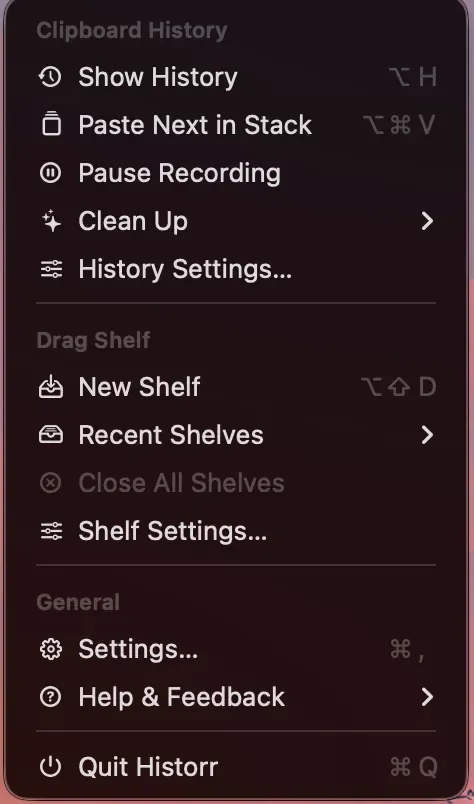
A shelf and a history list solve different tasks even when they live in the same app.
Use a few sample files to see whether collection reduces awkward window navigation for your workflow. Do not treat temporary shelf contents as your project’s permanent archive.
Which app should you choose?
Keep Maccy on your shortlist if you want focused local history and open-source availability. Investigate Historr if the queue, transformations, or file shelf are part of your daily routine.
Platform support may also matter. Confirm the current requirements on each product’s official site rather than installing an older release without checking compatibility.
Explore Historr and compare one real task at a time. For an alternative centered on multiple Apple devices, read the Paste comparison.