
A Free Paste Alternative for Mac: When Historr Fits
Quick answer: Historr is a free Paste alternative for Mac users who want local clipboard history, Paste Stack, text transforms, and a Drag Shelf. Paste remains relevant when you need its Mac, iPhone, and iPad workflow. Decide whether local Mac work or cross-device access matters more before switching.
- Author
- KainoLab Team
- Written
- Oct 8, 2026
- Product
- Historr
Searching for a free alternative does not mean your current app is unsuitable. It means you want to understand which features you need and what you are paying for.
Historr and Paste both help you reuse copied content, but they take different approaches. This comparison comes from KainoLab, the maker of Historr. The comparison describes official product information checked on 8 October 2026, rather than an independent performance test.
What does Historr offer instead?
Historr combines searchable clipboard history with actions on saved content. The screenshot shows a context menu for pasting, transforming text, opening a link, adding text to a Paste Stack, marking a favorite, or deleting an item.
A useful starting test is a task you repeat each day. Copy a public link and a short piece of approved text, then retrieve both without reopening their sources.
You can also use the shelf for dragged files. That is a separate workflow from clipboard history, covered in the Drag Shelf guide.
What should you compare with Paste?
| Decision | Historr | Paste |
|---|---|---|
| Main device workflow | Local Mac use | Mac, iPhone, and iPad |
| Clipboard storage approach | Local history, no cloud sync | Device storage and private iCloud sync |
| Price model | Free | Paid plans after a trial |
| Recurring payment required | No | Subscription and lifetime options are listed |
| Best reason to investigate | Mac history plus queue and shelf workflows | Access across Apple devices |
Paste documents its device support and private iCloud approach on its official product page. Its pricing page lists subscription and lifetime choices.
Do not treat “without a subscription” as a feature only Historr can offer. Paste currently has a lifetime option. A free product and a paid one-time purchase are different choices.
When is Historr a useful fit?
Consider Historr if most of your copy-and-paste work happens on one Mac. You may value a history window, reusable favorites, an ordered text queue, and file collection in one utility.
For example, entering a company name, website, and project summary into separate fields is an ordered task. The Paste Stack tutorial explains how to queue those values and check each destination.
Cleaning up copied text is another task. The menu exposes Plain Text, Trimmed, case changes, slug-case, and Pretty JSON.
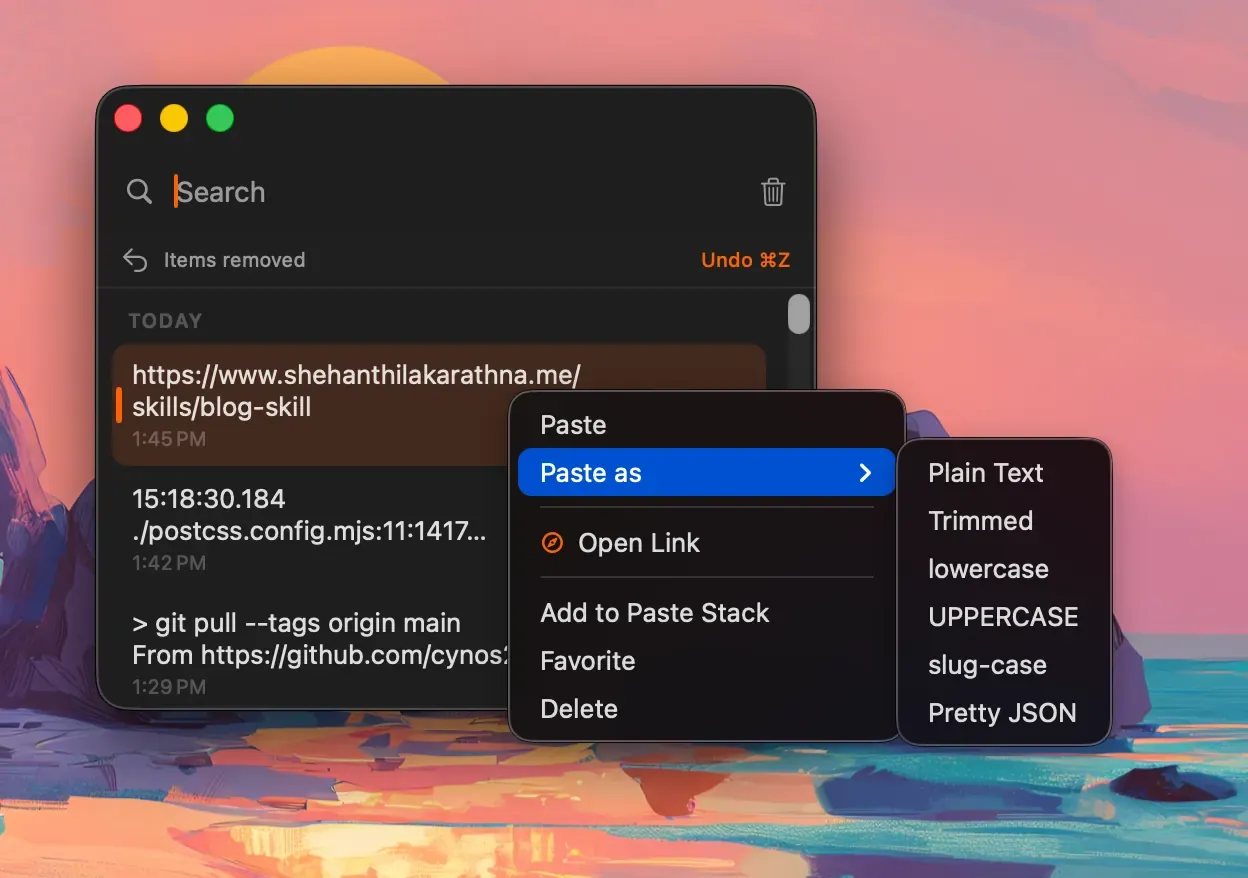
Choose a transformation for the destination rather than applying the same change to every item.
When should you keep investigating Paste?
If your main need is a clipboard shared between your Mac, iPhone, and iPad, compare that workflow carefully before moving to a local-only tool.
The right decision depends on what you actually use. A phone-to-Mac workflow may matter more than avoiding an account. Conversely, a Mac-only routine may not need cross-device history.
Avoid judging privacy only by whether cloud features exist. Understand the storage and sharing choices of the actual app and the requirements of your work.
How do you try an alternative without losing useful content?
- Identify the current snippets you rely on.
- Keep approved reusable text in a normal document.
- Install the alternative from its official source.
- Test search and paste with harmless examples.
- Test the specific extra feature you need.
- Check shortcut conflicts if both apps are running.
- Decide which tool to keep active.
Do not assume Historr imports Paste’s history or pinboards. No import capability is demonstrated in the screenshots.
Choose by the workflow you need
If your task needs local Mac history plus a text queue or file shelf, review Historr. If sync is central, evaluate Paste’s current plans and device support.
For a simpler local-history comparison, read Historr and Maccy. Choose the product that fits your required tasks, not the longest feature list.