
What Is Historr? A Free Clipboard History and Drag Shelf for Mac
Quick answer: Historr is a free macOS app from KainoLab that keeps your clipboard history, lets you paste items in order with a Paste Stack, transforms copied text, and collects files, images, links and text on a drag shelf. It runs on macOS 13 or later, stores data locally and needs no account.
- Author
- KainoLab Team
- Published
- Oct 31, 2026
- Product
- Historr
Photo: Domenico Loia on Unsplash. The cover is a stock photograph, not a Historr screenshot.
Publisher disclosure: Historr is made by KainoLab, the publisher of this guide. Product details were checked against official pages on 31 October 2026. This is not an independent test.
Historr is a Mac menu bar app that does two related jobs. It remembers what you copy, and it gives you a temporary shelf for things you drag. It is free, runs on macOS 13 Ventura or later and works on Apple Silicon and Intel Macs, according to historr.com.
This guide explains what Historr includes, who it suits and what to check before you try it.
What does Historr do?
| Feature | What it does |
|---|---|
| Clipboard history | Keeps recent copies and groups them as Today, Yesterday and Earlier |
| Search | Filter the list as you type, then choose with arrow keys |
| Favourites | Pin clips to the top; they survive Clear History |
| Paste Stack | Queue items and paste them in order with one shortcut |
| Paste as | Plain text, trimmed, lowercase, UPPERCASE, slug-case and Pretty JSON |
| Smart actions | Open links, compose emails and preview hex colours |
| Images | Stores screenshots with a thumbnail and size label |
| Quick Look | Press Space to preview a clip before pasting |
| Drag Shelf | Hold files, folders, images, links and text while you drag |
How do you open it?
Press Option-H to open the history. Press Return to paste the selected item, or Command-1 to 9 to paste one of the first nine instantly. A full list is on the keyboard shortcuts page. Our Historr keyboard shortcuts guide explains them in order.
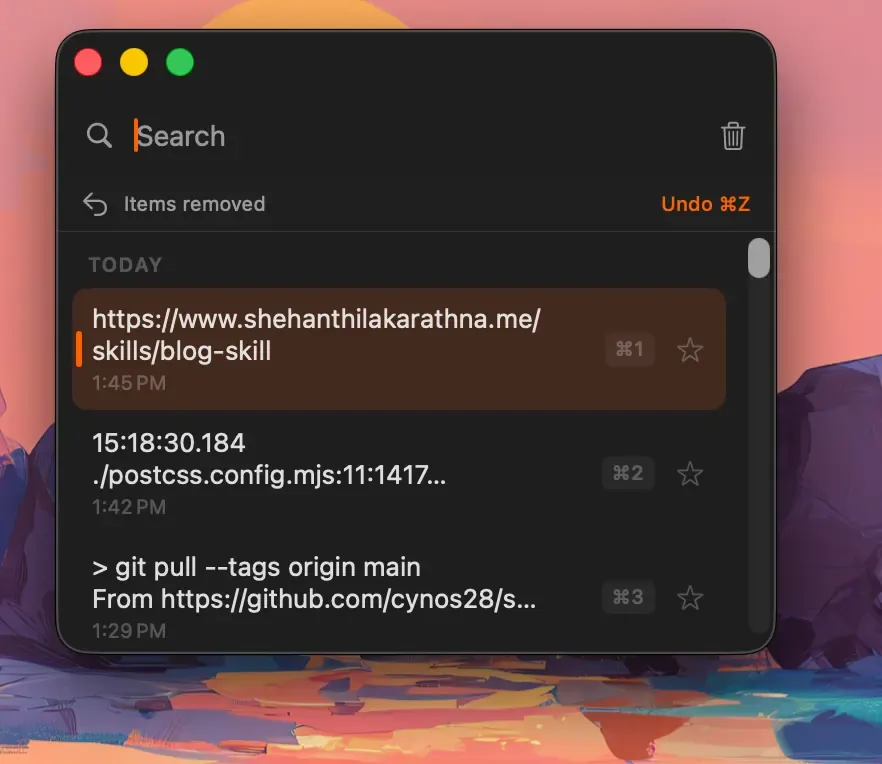
Real Historr screenshot supplied on 8 October 2026 (version 0.1.6). It illustrates the interface only.
What is the Drag Shelf?
The Drag Shelf is a floating tray. While dragging, you shake the pointer to open a shelf, or press Option-Shift-D to open an empty one. You drop items onto it, then drag the pile into any app. The Drag Shelf documentation says each item drops as a copy and the originals stay where they were.
The shelf menu lists actions such as Quick Look, Share, AirDrop, Save to Folder, Compress to ZIP, Resize Images and Extract Text. Shelves are temporary and are not saved after you quit Historr.
Is Historr private?
Historr states that history is stored locally on your Mac with no cloud, no account and no telemetry. Copies that password managers mark as concealed or transient are ignored. Detected card numbers, one-time codes and token-like values can be removed after a few minutes. The privacy documentation gives details, and notes it does not state encryption at rest.
Pasting into other apps requires macOS Accessibility access, which Historr asks for on first launch. See is Historr safe for a closer look.
Who is Historr for?
- People who lose earlier copies and want a searchable history.
- Anyone who fills forms and wants to queue several values.
- People who move files, screenshots and text between apps.
- Mac users who want a free, local tool without an account.
It may be more than you need if you only paste the most recent item. Apple documents a Spotlight clipboard history in macOS Tahoe, which may cover light use. See Apple’s guide.
How does it compare with other tools?
Historr combines history and a shelf. Maccy focuses on clipboard history and is open source. Yoink and Dropover focus on shelves. For side-by-side comparisons, read Historr vs Maccy, Dropover vs Historr and Yoink vs Historr, or our overall best clipboard manager for Mac guide.
How do you install it?
Download the DMG from the site, drag Historr into Applications and launch it. A menu bar icon appears. Our guide to installing and setting up Historr covers permissions and settings.
Frequently asked questions
Is Historr really free? The site describes it as free, with no subscription, account or upsells.
Who makes Historr? KainoLab, which also publishes these guides. We try to state this clearly and base claims on official documentation.
Does Historr sync across devices? No. It stores history locally and has no sync server.
Does Historr work with screenshots? Yes. The documentation says images and screenshots are stored in history with a thumbnail and size label, and you can preview them with Space.
Can I turn off automatic update checks? Yes. The documentation says automatic checks can be turned off in Preferences.
Key takeaways
- Historr combines clipboard history, a paste queue and a drag shelf.
- It is free, local and needs macOS 13 or later.
- Compare it with built-in history and other tools before choosing.


